Photonscore.One
FLIM analysis, open to your AI agent
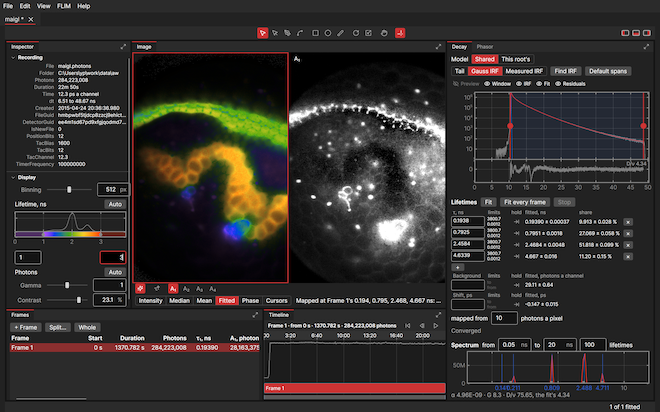
Photonscore One opens a LINCam recording and finds its lifetimes as it opens: one to six under an instrument response found from the decay itself, fitted per frame and per region, mapped per pixel, with phasor analysis and a lifetime spectrum. Everything on its screen is also a Python call, so an AI agent on your computer can run the analysis beside you.
Lifetimes, fitted as you look
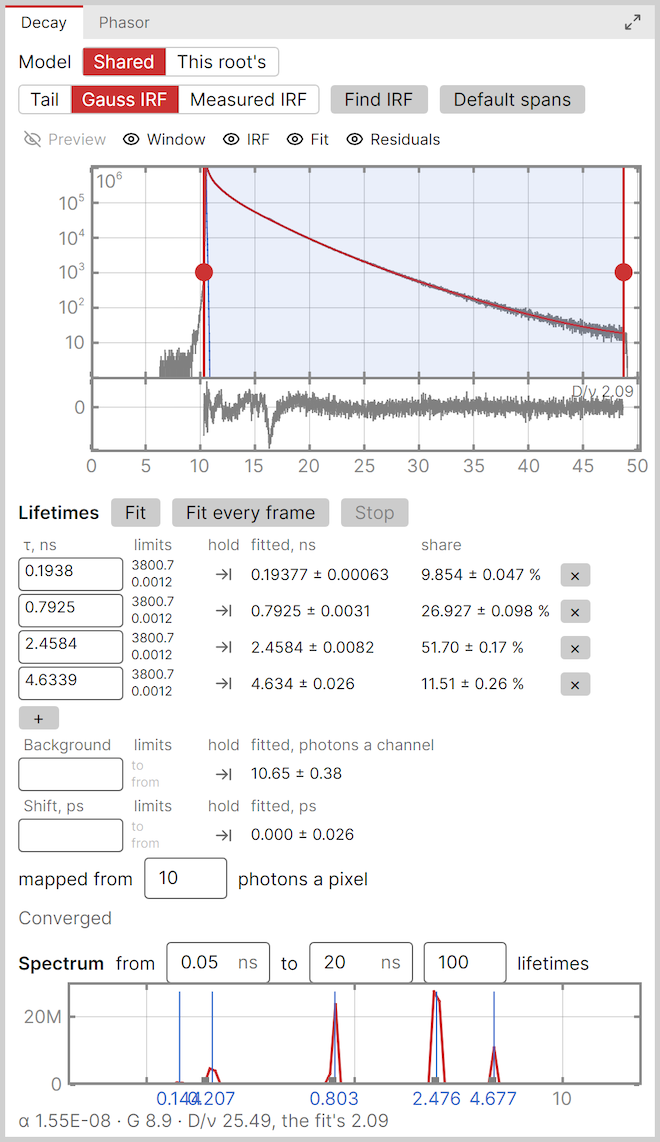
One fits a decay by maximum likelihood on the photon counts themselves, so the faint tail weighs what its photons are worth. The model is yours: a tail fit, a Gaussian instrument response, or one you measured, and Find IRF reads the instrument response off the decay itself.
One to six lifetimes, each with its error and its share of the photons, beside the background and the shift of the response. Hold any of them, bound it, add one; the residuals under the decay show what the model misses, and the fit follows the window's handles as you drag them.
Fit every frame repeats it over a time series, and the map fits every pixel holding ten photons or more under the frame's lifetimes. The spectrum under it needs no model: a hundred lifetimes from 0.05 to 20 ns by maximum entropy, its peaks where the fit put its four.
Phasor analysis
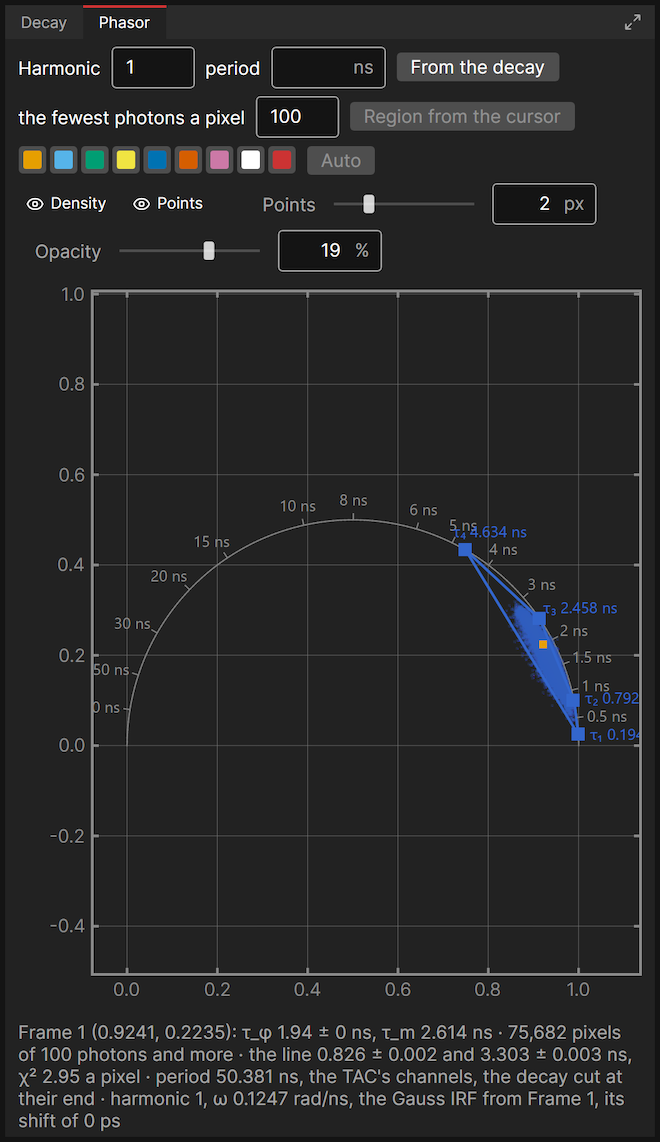
The phasor of every pixel, drawn as a density or as points over the universal circle. The fitted lifetimes stand on the circle, joined, so a pixel's place between them reads as their mix.
The harmonic and the period are yours or the decay's, and the instrument response and shift the fit found are taken out. A line through the cloud meets the circle at two lifetimes, and the frame's phase and modulation lifetimes stand under the plot.
Cursors on the plot, each its own colour, pick the pixels under them and mark them on the picture; a cursor becomes a region with a decay of its own.
Lifetimes over time

A tumour's autofluorescence at 480 nm, 3.4 billion photons over 2 h 38 min, cut into twelve frames of 3 min 5 s from its 50th minute, about 90 million photons each. Fit every frame fitted all twelve with four lifetimes under a Gaussian instrument response, and every one converged, at a deviance per degree of freedom of 1.30 to 1.41.
Each picture is its frame's fitted map with AI Enhance, the mean lifetime coloured from 2.2 to 4.1 ns. Read row by row, the core turns from green to blue: the four lifetimes stay within a few per cent from frame to frame while the 1.4 ns one's share grows from 29 to 32 %.
Every frame's lifetimes, shares and errors stand in one table, which Python reads as one call.
Recordings to try
LINCam recordings to open in the Demo, every photon in them: download one, open it, and One finds its lifetimes.

The section on this page: 284 million photons over 22 min 51 s, 1.5 GB.
T cells
58 million photons over 7 min 52 s, 423 MB.
T cells by MIET
Metal-induced energy transfer: T cells in wide-field and in TIRF, and the instrument response, three recordings in one zip of 1.8 GB.
Steak
108 million photons over 1 h 33 min, 813 MB.
Try it

Photonscore One Demo
Evaluate every feature with the Demo, no license needed: the fits, the maps and the phasors, AI Enhance, and your AI agent at the controls. Saving and exporting pictures and tables come with Photonscore One.