 PhotonPix user manual
Introduction
The PhotonPix is an integrated module for photon counting based on a microchannel-plate photomultiplier tube (MCP-PMT). It comprises an MCP-PMT detector, high-voltage power suppliers, a constant fraction discriminator (CFD), cooling, overexposure and overheat protection circuits and a microcontroller.
An MCP-PMT operation is supported by an integrated high-voltage (HV) power supply. The HV divider applies voltages to three main points: the photocathode, the MCP stack and the anode. The photocathode can be quickly switched on or off by the overexposure protection circuit or by user command. The output of the anode is connected to a fast RF amplifier. The output signal of the amplifier is split by a fast active signal splitter. One of these signals is available to the user via 50Ω matched SMA connector marked as “Anode”. The second of the signals is fed into a CFD. The output of the discriminator is a logical current signal of 20mA that on 50Ω load results in -1/2V amplitude.
The microcontroller enables the control HV power supplier. The user can adjust the MCP voltage to optimize the parameters for measurement conditions. The voltage at the MCP stack is required to be stable and shall be applied slowly. Practically the increase from zero to the working voltage level takes up to five seconds. The photocathode is supplied independently and can be switched on or off within hundreds of milliseconds timescale with the software. However, the protection circuit has an integration time of 1ms. This independent scheme is crucial to implement built-in overcurrent protection. Additionally, it is a convenient user-available feature to temporarily block the photocathode for the maintenance or adjustments of the experimental setup.
CFD requires setting up threshold and zero-crossing voltages. Those values are fully defined by the user depending on expected photon flux.
Output signals
The output signal oscillogram is shown in figure below. The upper (red line) depicts an amplified analog anode output signal. The lower trace (green line) shows corresponding logical NIM signal. There is a delay of about 2ns between anode and NIM caused by CFD logical elements. Please note that there is a finite dead-time of the CFD.
At the time between 14-18ns there are three pulses visible in the analog channel that yield only two logical pulses at the output. This is due to the finite electronic dead-time of the CFD.
To visualize and measure the dead time of the PhotonPix a longer signal acquisition was performed. In the figure below the oscilloscope was triggered by NIM signal and both traced were integrated over several seconds. As one can see there is a time range of 1.6ns after the leading edge of NIM signal where no second pulse appears. This shows the dead time of the CFD.
Before you begin
Safety measures
Before starting to use PhotonPix please read carefully the measures listed in this section. PhotonPix is extremely sensitive equipment and shall be handled with care to avoid detector damage.
Always use protective cap during storage
Even without high voltage applied the photocathode can be damaged. Do not expose photocathode to bright light during storage.
There is overexposure protection built into controlling electronics. This protection circuit counts the pulses every 1ms and disables high-voltage applied to the photocathode once counts exceed 120K, corresponding to 120MHz of overall count-rate. However strong fluctuations in the light flux like a photo flash can be faster than integration period of 1ms thus damaging the photocathode.
Avoid strong illumination changes
During the measurement apply measures to avoid overexposure.
To avoid overexposure, make sure the illumination conditions are under your control as much as can be reached. Please note, the fact that one does not see the light does not imply there is no light. The radiation can include an invisible part of light spectra, the sensitivity of the PhotonPix is much higher than bare eye.
Control the surrounding
Perform detector operation only in the controlled illumination environment.
The detector is cooled by the Peltier thermal element that requires secondary cooling to dissipate heat. The voltage to the Peltier element is applied when PhotonPix is connected to the power source. Non-properly running secondary cooling may result in overheating and detector damage. The alarm signal is triggered once one of the conditions met: (1) detector temperature exceeds 40°C; (2) electronics temperature exceeds 60°C. The alarm also disables Peltier power.
Avoid overheating
Connect the cooling and make sure the coolant liquid is circulating before applying main power.
Starting the first measurement
Please use the following check list to get started with the detector:
- Cooling is connected and a coolant liquid is circulating.
- The photocathode is closed, and all external light sources are off.
- The detector is connected to the computer and is recognized in the software.
- The main power is connected.
Once all the above points are satisfied one can apply the main power.
In the box
PhotonPix is shipped with everything one needs to start counting photons. Please provide your preference when ordering the power plug for your country and USB cable options. The operation requires liquid cooling unit that is provided separately. Please consult us prior ordering to get more information.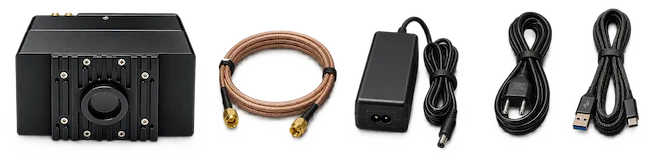
Hardware
PhotonPix is an integrated single photon counting module build on microchannel-plate based photomultiplier tube (MCP-PMT). To grant robust and fast acquisition the module integrates the following:
- MCP-PMT high-voltage power supply.
- Overexposure and overheat protection circuits.
- Communication micro-controller.
- Integrated Peltier cooling.
- Power supply modules for every element accepting a single external voltage.
- Constant-fraction discriminator (CFD).
Features

The optical input is a standard C-Mount with 1-32 UN 2A ANSI B.1 (Ø1 inch, 32 thread per inch). The detector is protected by the anti-reflection coated glass. The active detector area is Ø8mm.
The housing has 4 mounting holes: two on the shorter side, one on top and one on the bottom side. All the holes have M4 thread suitable for mounting to optical setup. The pair of side holes is 25mm apart matching a standard distance of mounting holes of optical table or bread board. Depending on your setup the device can be mounted with the hole on top or at the bottom.
There are two chiller tubing connectors. They must be connected to the chiller before applying main power.
Two signal outputs are available via female SMA connectors: analog and logical. Analog output is connected directly to the amplified anode signal before CFD. This output enables monitoring of signal amplitude and frequency with oscilloscope. The second NIM logic output is a main signal source to be used with timing electronics.
USB-C control port shall be connected to the computer for proper operation. If there is no voltage applied with USB nor the HV neither Peltier power will be applied.
Mechanical drawings
All sizes are in mm (inches “). All the mounting holes are in the same plane 8.4mm from the back side.


Power consumption
The module accepts any direct current voltage in a range of 5-12V. Depending on applied voltage different detector temperature is set and consequently different thermal dark count is reachable. The power consumption of electronics is 3.5W excluding Peltier thermal element. The consumption and corresponding thermal noise measured with one red-extended Photonis HiQE-Green photocathode are summarized in the table below.
| Peltier voltage, V | Current, A | Power, W | Thermal noise, Hz |
|---|---|---|---|
| 5 | 1.55 | 7.8 | 140 |
| 9 | 1.84 | 16.6 | 40 |
| 12 | 2.10 | 25.2 | 20 |
Please note, that a liquid cooling is mandatory for dissipating power above ~17W.
Software Installation & Configuration
Installation
The LINPix Control Software (LINPix Ctrl) is deployed as a ZIP-Archive, containing a single executable (.exe) and a default config.json file containing the detector definitions. To install it, just unzip the archive and place it at your desired destination. Then the software can be started by starting the LINPix Ctrl.exe, also Shortcuts can be created.
Configuration
The control software is stateless and has no built-in knowledge of detectors. When a PhotonPix is connected to the PC over USB 2.0 it is enumerated by the software and appears in the detector list, where the CFD values (Zero Crossing, Threshold) and the high voltage can be set by hand.
For larger setups, or where the working values are already known, the software can be configured through a config.json file placed in the same directory as PhotonPixControl.exe. On startup, and whenever a detector is connected, the software looks for that detector's serial number in the configuration file and applies the values it finds there.
Here is an example of a configuration file:
{
    "TextFieldsScrollable": false,
    "remoteBind": "localhost",
    "remotePort": 50053,
    "Detectors": [
        {
            "Description": "H604-B513",
            "HighVoltage": 3870,
            "ZeroCross": 2200,
            "Threshold": 400,
            "PhotoCathode": false,
            "Label": "Epsilon Reflection Blue"
        },
        {
            "Description": "Z837-E839",
            "HighVoltage": 4025,
            "ZeroCross": 2200,
            "Threshold": 400,
            "PhotoCathode": false,
            "Label": "Omicron Transmission Aqua"
        }
    ]
}
The following global settings apply to the software as a whole:
TextFieldsScrollable— defines whether the values of fields can be changed by scrolling while the mouse hovers over them.remoteBind— the network address on which the remote control interface accepts connections. The default, localhost, allows connections only from the same computer. Use 0.0.0.0 to accept connections on every network interface, or the address of a single network card to expose the interface on that network alone. An entry that is not a valid address falls back to localhost.remotePort— the TCP port of the remote control interface, 50053 by default. Change it if the port is already in use; LINCam Capture uses 50051 and LINTag Capture 50052, so all three may run side by side on one computer.
The element Detectors is a collection describing individual detectors:
Description— the serial number of the detector, laser engraved on each unit.HighVoltage— the setting of the high voltage power supply, values from 0 to 4095. The supply is walked to a new setting rather than jumped to it; a full-range change takes about 2.5 seconds and a shorter one proportionally less.ZeroCross— the setting of the zero crossing of the CFD, values from 0 to 4095.Threshold— the setting of the threshold of the CFD, values from 0 to 4095.PhotoCathode— defines whether the detector is initialised with the photocathode switched on or off, either true or false.Label— a label or comment for the detector, to identify it more easily.
The settings of the high-voltage, threshold and zero-crossing values are given in 12-bit digital-to-analog converter (DAC) code. The table below summarizes the approximate conversion coefficients to physical values.
| Parameter | DAC code = 0 | DAC code = 4095 |
|---|---|---|
| Threshold, mV | 0 | -120 |
| Zero crossing, mV | -23 | +23 |
| High-Voltage, V | 0 | -2460 |
Remote control
The control software exposes a remote control interface, so that every PhotonPix connected to a computer can be driven from a measurement script instead of by hand. It covers what the user interface covers: the high voltage, the CFD threshold and zero crossing, the photocathode switch, the per-detector label, and the alarm state of each detector. Detectors are addressed by the serial number engraved on the housing.
The interface is served on the address and port given by remoteBind and remotePort above. Out of the box it listens on localhost only, which means it can be used by software running on the same computer but is not reachable from the network. Setting remoteBind to 0.0.0.0 makes it reachable from other computers.
A Python client is included in the Photonscore Python package:
from photonscore import PhotonPixRemote

pix = PhotonPixRemote("192.168.1.10:50053")
pix.sync()
print(pix.detectors)

pix.setup_detector("H604-B513", high_voltage=3870,
                   zero_cross=2200, threshold=400)
pix.all_photocathodes(True)
pix.sync()
The user interface and the remote interface drive the same hardware and stay in step: a change made remotely appears in the window, and a change made in the window is reported remotely.
Note: the remote control interface has no password and no encryption. Anyone able to reach the port can switch photocathodes on and change the high voltage. Only set remoteBind to an address other than localhost on a network you trust.
The control window
The window is in two halves. The upper panel holds the controls that act on the setup as a whole and on whichever detector is selected; the lower panel is the detector list, one row per PhotonPix the software knows about.
Master Controls act on every connected detector at once. All Photocathodes switches all photocathodes on or off together — the fastest way to make a setup safe — and the button is lit while they are all on. Master Alarm is an indicator rather than a button: it lights whenever any detector is in alarm, so an overexposure or overheat condition anywhere in the setup is visible without reading down the list. Both are disabled while no detector is connected.
Settings edits the detector currently selected in the list. High Voltage, Zero Crossing and Threshold are 12-bit DAC codes from 0 to 4095; typing a value or using the arrows applies it immediately, and the high voltage walks to its new setting rather than jumping to it. The Photocathode checkbox switches that one detector’s photocathode. The whole group is greyed until a detector is selected — click a row to select it, press Escape to deselect.
The detector list carries one row per detector, sorted by serial number. S/N is the number laser engraved on the housing, and Description the free-text label from config.json. Active marks the row currently selected for editing. Photocathode and Alarm mirror that detector’s live state. High Voltage, Threshold and Zero Crossing show the values in force, the high voltage following the ramp as it moves. Values from config is ticked where the software found that serial number in config.json and applied its settings when the detector was enumerated.
A row can be in one of three conditions, all three shown in the figure above. A detector that is plugged in and listed in config.json shows its configured values with Values from config ticked. A detector that is plugged in but not listed appears with an empty description and zeros — it has been found, but nothing has been commanded to it yet, so it is yours to set up by hand. A detector that config.json lists but which is not plugged in keeps its row, greyed out: the software shows the settings it would apply, so a missing unit is noticed rather than silently absent. Nothing can be read from or written to a greyed row.
Conducting the first measurement
The photocathode is the part of a PhotonPix that cannot be repaired. It is damaged by light — most severely while the high voltage is on, but also in storage with no power applied at all. The procedure below therefore brings the detector up in darkness and admits light only as the final step, once the count rate can be watched.
Read Safety measures before the first run, and satisfy the checklist in Starting the first measurement before any power is applied.
Preparing the cooling
The PhotonPix is cooled by a Peltier element inside the housing. The chiller does not cool the detector directly — it only carries away the heat the Peltier element pumps out. There is therefore no temperature to set on the chiller: coolant at room temperature is what the module expects, and the Peltier element regulates itself to the detector’s working temperature. A few degrees either way — ±5 °C — makes no practical difference. What matters is that coolant is moving.
Confirm circulation, not just a running pump
A pump running against a closed valve or an airlock moves nothing. Check that coolant is actually flowing before main power is applied.
Before applying main power:
- Connect both chiller tubing connectors, observing the flow direction marked on the housing.
- Check that no line is kinked, pinched or sharply bent.
- Start the chiller and confirm that coolant is moving — the flow indicator is reading, or flow is visible in the return line.
- Inspect both couplings and the full run of tubing for leaks. Any moisture near the housing is a reason to stop.
- Let the loop run long enough for trapped air to clear.
Liquid cooling is mandatory wherever the module dissipates more than about 17 W. Without it the detector will not reach its working temperature, the thermal dark count will be high, and the overheat alarm will eventually cut the Peltier power.
Applying power
Work in a darkened room with the protective cap in place. Leave the cap on until the operating point is set.
Bring the detector up in darkness
Switch off or block anything that could change the illumination while the detector is live: room lights on a motion sensor, a phone screen, a camera flash, an indicator LED on nearby equipment. The overexposure protection integrates over 1 ms, so a short bright flash can deliver a damaging dose inside a single integration window.
With the coolant circulating, connect the module in this order:
- Connect the USB-C control port to the computer. Neither the high voltage nor the Peltier element is powered unless USB is present, so this comes before main power.
- Connect the NIM output to your timing electronics with the supplied SMA cable, and, if you want to watch the pulse shape, the analog output to an oscilloscope with a 50 Ω input.
- Connect the main power supply — any direct voltage from 5 to 12 V. The applied voltage sets the detector temperature the Peltier element reaches, and with it the thermal dark count; see Power consumption.
- Switch the main power on.
Start PhotonPixControl.exe. The detector appears in the list, identified by the serial number engraved on its housing. Where that serial number is listed in config.json, its high voltage, threshold and zero crossing are applied on enumeration and the Values from config column is ticked.
Confirm before going further:
- The serial number shown matches the detector in front of you.
- Photocathode is unticked — the photocathode is off.
- Alarm is unticked. An alarm here means the protection circuit has already fired, from light or from temperature — find the cause before continuing.
Allow 10 minutes after switching on before taking calibrated measurements. The detector temperature is actively stabilised, but the assembly needs that time to reach thermal equilibrium. Timing measurements taken during warm-up will drift.
Setting the operating point
With the cap still on and the photocathode still off, set the MCP high voltage to its operating point. The software walks the supply to a new setting rather than jumping to it; a full-range change takes about 2.5 seconds and a shorter one proportionally less. Wait for the displayed value to stop moving before continuing.
The configured voltage is also a ceiling
Where a detector is listed in config.json, the HighVoltage given there is not only the value applied at start-up — it is the highest the software will go for that detector. Requests above it are clamped, and the remote control interface refuses them outright. This lets a detector be commissioned once at a voltage known to be safe for it, and prevents a later operator overdriving the MCP stack with a mistyped digit. To work above that level, raise the value in config.json and restart the software.
Then set the CFD. With the cap on you are looking at the dark count rate: raise the threshold until it is acceptably low. A threshold set too close to the noise floor will show a high rate with no light at all. Good starting values are 2000 for zero-cross and 400 for the threshold.
| Parameter | Typical value | Notes |
|---|---|---|
| CFD threshold | −50 to −200 mV | Adjust to suppress MCP noise |
| CFD zero-cross | −10 to −30 mV | Minimise timing jitter |
Admitting light
Only now, with coolant circulating, the voltage settled and the CFD set:
- Prepare the optical path — sample in place, source attenuated to the lowest level that will still give a usable signal.
- Enable the photocathode.
- Remove the protective cap.
- Watch the count rate and raise the light slowly, in steps, letting the rate settle between them.
Never uncover the detector into unknown light
Keep the working count rate well below the 110 MHz protection threshold; below 10 MHz is typical for single-photon experiments. The protection cannot save a photocathode from a flash that arrives inside one 1 ms integration window.
Overload protection & Shutdown
The detector is equipped with overload protection and automatic shutdown. The protection circuit raises the alarm on any of three conditions:
- The count rate exceeds 110 MHz, measured every 1 ms.
- The detector temperature exceeds 40 °C.
- The electronics temperature exceeds 60 °C.
The alarm disables the photocathode high voltage and the Peltier power. The MCP voltage is left as it is, and the Alarm column marks the detector that tripped.
To recover from an overexposure alarm, reduce the light flux to a safe level — block the beam or increase attenuation — confirm the alarm has cleared, and enable the photocathode again. Do not re-enable into the same illumination. A detector that trips repeatedly at a light level you believe to be safe is a reason to stop and investigate.
To recover from a temperature alarm, check the chiller and the coolant flow first. The Peltier element is switched off by the alarm, so the detector will warm further until cooling is restored.
Standard operation
One or more detectors are controlled via the included software. Once a detector is characterised, the routine run is:
- Start the chiller and confirm coolant is moving.
- Switch on main power and start PhotonPixControl.exe; confirm the detector is listed and not in alarm.
- Set the MCP voltage and wait for the ramp to finish.
- Set the CFD threshold and zero-cross.
- Enable the photocathode with the optical path prepared.
- Monitor the count rate.
- Begin acquisition in your measurement software.
Shutting down
- Block the light or close the shutter.
- Switch the photocathode off.
- Set the MCP voltage to zero and wait for the ramp down — it is as slow as the ramp up.
- Replace the protective cap.
- Switch off main power and disconnect USB-C.
- Stop the chiller last, once the detector has come back to room temperature. The Peltier element needs the coolant while it is still shedding heat.
Keep the cap on
Replace the protective cap whenever the detector is not actively measuring, powered or not. Ambient light damages the photocathode in storage.
Warning
Please note that the detector's sensitivity may decrease with use. Higher count-rates results in faster degradation and consequently a shorter lifetime of the detector. This is an inherent process and thus photocathode sensitivity degradation and/or MCP gain reduction is not covered by the warranty.
Revision history
| 22 Sep 2026 | Added remote control description |
|---|---|
| 21 Sep 2026 | Minor review |
| 14 Jan 2025 | Initial revision |